AI-Written SEO Metadata in CFML on Lucee
I came across a neat little open-source component from codemonkeystudios: give it a page’s title and content, and it uses AI to write you an SEO meta title and description. Clean, practical, the kind of thing every CMS could use.
It’s built on ColdFusion 2025’s native AI, the new ChatModel() function. Credit where it’s due — in CF2025 that’s a single built-in call, no SDK, no HTTP plumbing:
var chat_model = ChatModel( config );
var response   = chat_model.chat( prompt );
That’s about as easy as it gets. The catch for me is just licensing: ChatModel() lives in Adobe ColdFusion 2025, and I don’t have an ACF licence — I run Lucee, which is free and open source and what my CFML projects sit on. So the component won’t run for me out of the box. Getting it working on Lucee turned out to be a tidy little exercise, so here’s what I did.
Don’t rewrite it — replace the one missing piece
The thing is, the component is good. It builds a careful prompt, sanitizes the input, asks the model for strict JSON, validates what comes back, and has guardrails so it won’t hand you a 300-character meta title or leak markup. I didn’t want to touch any of that.
The only Lucee-incompatible line is the call to ChatModel(). So I wrote a Lucee-native stand-in for exactly that:
// CF2025:   ChatModel( cfg ).chat( prompt )
// Lucee:    new lib.ChatModel( cfg ).chat( prompt )
cm    = new lib.ChatModel( { provider: "openAi", apiKey: key, modelName: "gpt-4.1-mini" } );
reply = cm.chat( "Write me a meta description for..." );
lib/ChatModel.cfc is tiny. It takes the same config keys CF2025 uses, makes a plain cfhttp call to the OpenAI API, and hands back the model’s text. That’s it. Provider dispatch is baked in too, so adding Anthropic or Azure later is just another case.
Then the SEO component itself becomes a four-line subclass that reuses everything from the original and overrides only the model call:
component extends="seo_and_metadata_ai" {
    private struct function call_chat_model( required string prompt ) {
        var chat = new lib.ChatModel( { provider: "openAi", apiKey: variables.api_key,
                                        modelName: variables.model_name, responseFormat: "json" } );
        // ...wrap the reply in the struct the parent expects
    }
}
All the upstream prompt-building and validation runs untouched. Net result: the exact ColdFusion 2025 behaviour, with no ColdFusion 2025 required.
Using it
seo = new seo_metadata_generator( server.system.environment.OPENAI_API_KEY );

result = seo.generate(
    page_title = "Always-Free OCI Web Stack",
    site_name  = "cfml.kukiel.dev",
    page_slug  = "guides/oci-free-tier",
    page_text  = "A guide to running a production CFML site on Oracle Cloud's free tier..."
);

writeOutput( result.meta_title );        // validated, length-checked
writeOutput( result.meta_description );
Feed it that, and OpenAI comes back with:
Always-Free OCI Web Stack Guide | cfml.kukiel.dev — 49 chars Learn how to run a production CFML site on Oracle Cloud’s Always-Free tier using Arm A1, Docker Lucee, Terraform, and free HTTPS certificates for $0/month. — 155 chars
Both land right in the ideal SEO length ranges, which the component enforces for you.
A demo you can actually look at
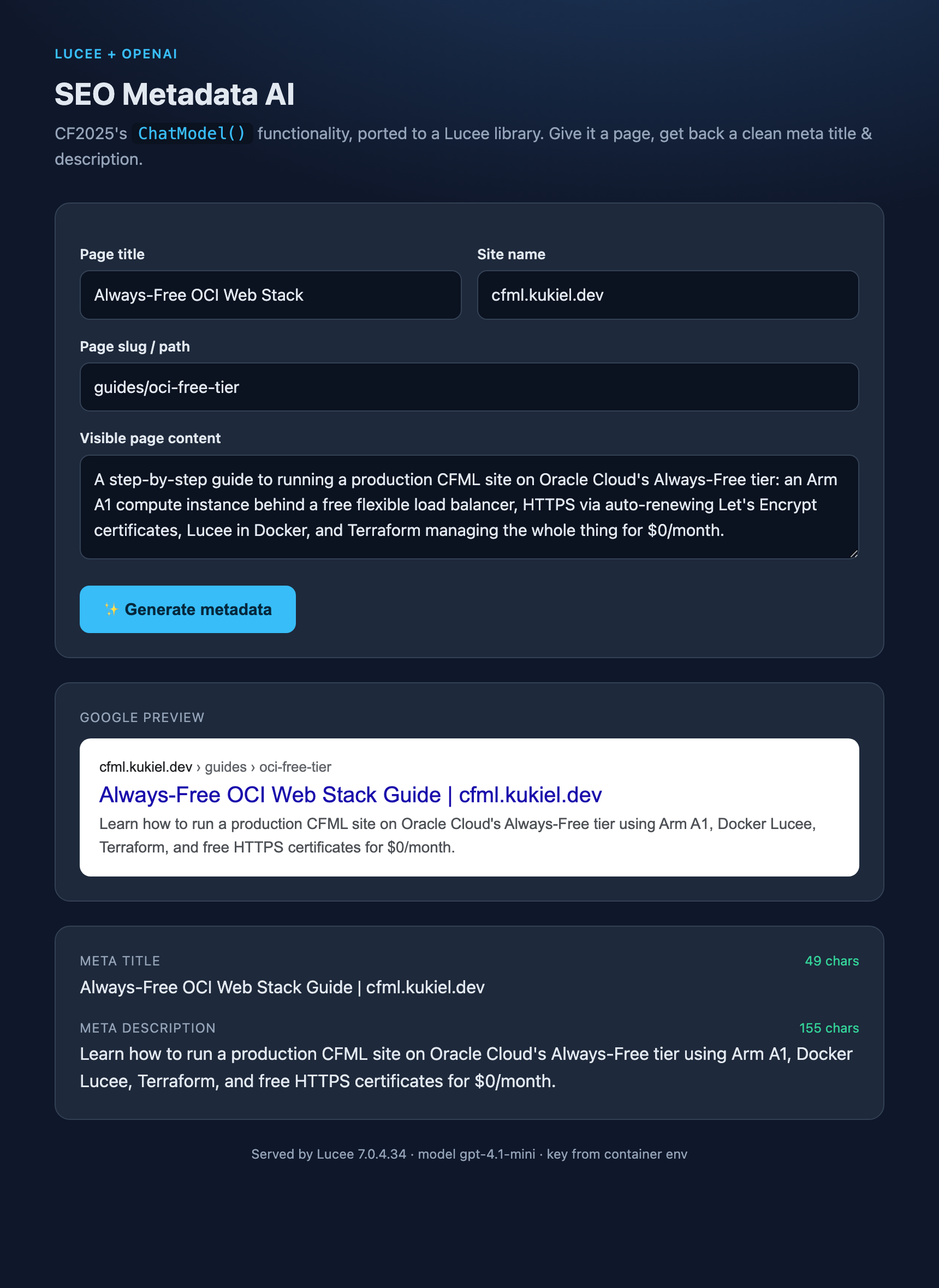
I also threw together an index.cfm so you can see it work instead of reading structs in a dump. It’s a form — page title, site name, content — and when you hit generate it renders a live Google-style search result preview with character counts that go green when they’re in the sweet spot. Much nicer than guessing whether 71 characters is too long (it is).
Running it is one command
The key never gets hard-coded. It’s injected as an environment variable through Docker Compose:
cp .env.example .env        # paste your OpenAI key
docker compose up
# → http://localhost:8888/index.cfm
Compose serves the repo on Lucee 7 and mounts it live, so you can edit a .cfc and just refresh — no rebuild. If the key’s missing, Compose stops with a clear message instead of a mystery 500.
Grab the code
It’s on GitHub — cfml_seo_and_metadata_ai (Lucee fork). Clone it, drop in an OpenAI key, docker compose up, done. The README explains the why and the how.
Full credit to codemonkeystudios for the original — all the clever SEO and validation work is theirs. My fork just ports the one AI call so the rest of us on Lucee can run it. That’s the nice thing about a small, well-factored library: making it work somewhere new was a couple of files, not a rewrite.
And yes, of course I used my friend Claude for this project.